

Finding the right IDE can transform your coding experience from frustrating to flowing. The good news? Some of the most powerful development environments in 2026 are completely free—offering features that rival or surpass paid alternatives.
Whether you’re building web apps, crafting Python scripts, or diving into AI-assisted coding, there’s a free IDE perfectly suited to your workflow. I’ve spent months testing these tools to bring you the definitive guide to free IDEs in 2026.
Quick Summary: Best Free IDEs at a Glance
- Best Overall: Visual Studio Code – unmatched extension ecosystem and versatility
- Best for AI-Assisted Coding: Cursor (Free Tier) – Claude-powered intelligence built in
- Best Lightweight Option: Zed – blazing fast and open source
- Best for Java: IntelliJ IDEA Community – professional-grade Java tooling
- Best for Python: PyCharm Community – deep Python support out of the box
- Best for Beginners: VS Code with Codeium – free AI completions with gentle learning curve
What Makes a Great Free IDE in 2026?
The IDE landscape has shifted dramatically. In 2026, developers expect:
- AI Integration: Built-in or easy-to-add AI code completion and chat
- Performance: Fast startup times and responsive editing, even with large codebases
- Extension Ecosystem: Rich marketplace of plugins and themes
- Language Support: First-class support for multiple languages and frameworks
- Git Integration: Seamless version control without leaving the editor
Let’s dive into each IDE and discover which one fits your workflow.
1. Visual Studio Code – The Industry Standard
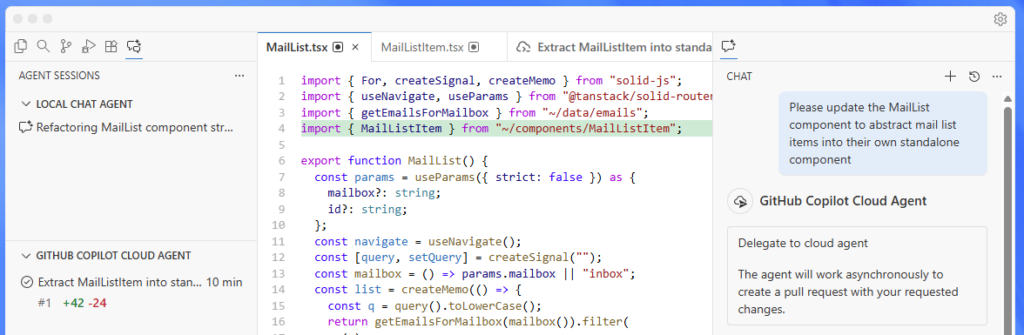
VS Code remains the most popular IDE worldwide, and for good reason. Microsoft’s free, open-source editor strikes the perfect balance between simplicity and power.
Why Developers Love VS Code
- Extension Marketplace: Over 40,000 extensions covering every language and framework
- Integrated Terminal: Run commands without switching windows
- IntelliSense: Smart completions based on variable types, function definitions, and imported modules
- Remote Development: Code on remote machines, containers, or WSL seamlessly
- Debugger: Built-in debugging for Node.js, with extensions for virtually any language
AI Capabilities
VS Code pairs brilliantly with AI assistants. Add GitHub Copilot ($10/month) for premium AI, or use the free Codeium extension for unlimited AI completions at no cost.
Ideal For
Web developers, JavaScript/TypeScript programmers, Python developers, and anyone who values flexibility. If you’re unsure which IDE to choose, start here.
Price: 100% Free and open source
2. Cursor – AI-Native Development
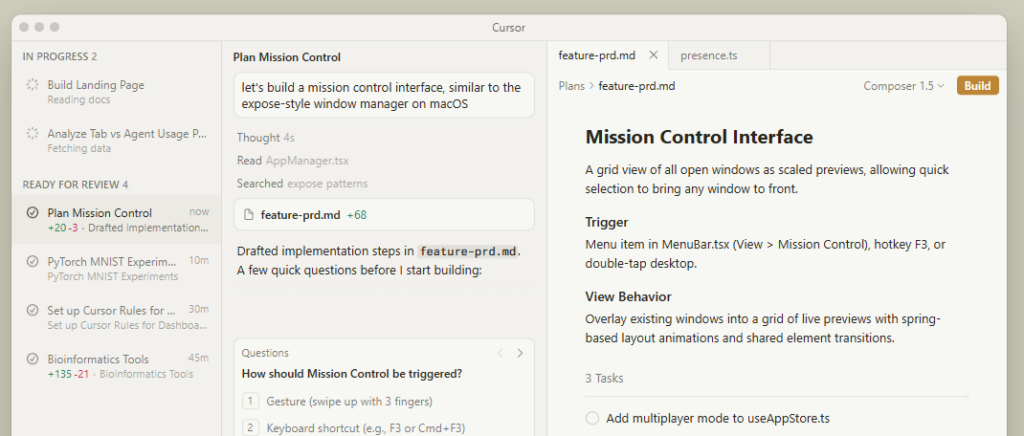
Cursor has revolutionized how developers write code. Built as a VS Code fork, it integrates AI so deeply that it feels like having a senior developer pair-programming with you constantly.
What Sets Cursor Apart
- Claude Integration: Anthropic’s Claude powers intelligent code generation and explanations
- Codebase Awareness: AI understands your entire project, not just the current file
- Composer Mode: Describe features in natural language and watch Cursor build them
- Inline Chat: Ask questions about code without leaving your workflow
- VS Code Compatibility: Your favorite extensions work seamlessly
Free Tier Limitations
The free plan includes limited AI requests per month—enough for hobbyists and students. Power users will want the Pro plan ($20/month) for unlimited usage.
Ideal For
Developers who want AI assistance baked into every interaction. Especially powerful for learning new codebases, refactoring, and rapid prototyping.
Price: Free tier available; Pro at $20/month
For a detailed comparison, check out our VS Code vs Cursor comparison.
3. Zed – The Speed Demon
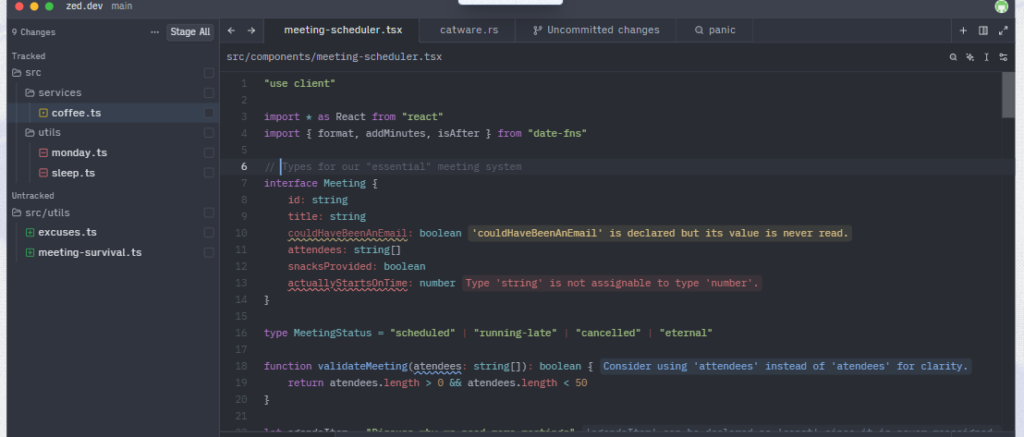
Zed is the new kid on the block that’s making waves. Built in Rust by former Atom developers, it’s possibly the fastest code editor you’ll ever use.
Why Zed Stands Out
- Blazing Performance: GPU-accelerated rendering means instant response, always
- Collaboration Built-In: Real-time collaboration without plugins
- Open Source: Fully open source as of January 2024
- Minimal Design: Clean interface that stays out of your way
- AI Ready: Built-in AI assistant with support for multiple providers
Current Limitations
The extension ecosystem is still growing. If you rely heavily on specific VS Code extensions, check availability first. macOS and Linux only (Windows support coming).
Ideal For
Developers who value speed above all else, open-source enthusiasts, and teams who collaborate frequently on code.
Price: 100% Free and open source
4. IntelliJ IDEA Community Edition – Java Excellence
When it comes to Java development, nothing beats JetBrains’ IntelliJ IDEA. The Community Edition is completely free and includes everything most Java developers need.
Community Edition Features
- Smart Code Completion: Context-aware suggestions that understand your code deeply
- Refactoring Tools: Safely rename, extract methods, and restructure code
- Built-in Debugger: Step through code with ease
- JUnit Integration: Write and run tests without additional setup
- Maven/Gradle Support: First-class build tool integration
What’s Missing vs Ultimate
The Community Edition lacks Spring framework support, database tools, and some web development features. For pure Java, Kotlin, or Groovy development, it’s more than enough.
Ideal For
Java developers, Android developers (though Android Studio is based on this), and anyone working with JVM languages.
Price: Free (Ultimate at $599/year)
5. PyCharm Community Edition – Python Powerhouse
JetBrains’ dedicated Python IDE offers the same quality and polish as IntelliJ, focused entirely on Python development.
Why Python Developers Choose PyCharm
- Intelligent Python Editor: Deep understanding of Python syntax and semantics
- Virtual Environment Management: Create and manage venvs effortlessly
- Scientific Tools: Great for data science with NumPy, Matplotlib support
- Testing Integration: pytest, unittest, and doctest support built in
- Code Quality: PEP 8 checks and automatic formatting
Community vs Professional
The free Community Edition covers pure Python development well. You’ll need Professional ($249/year) for Django, Flask, or database tools.
Ideal For
Python developers, data scientists working with pure Python, and anyone building Python applications or scripts.
Price: Free (Professional at $249/year)
6. Eclipse IDE – The Open Source Veteran
Eclipse has been a developer staple for over two decades. It’s not the trendiest choice, but it’s rock-solid and extensible.
Eclipse Strengths
- Massive Plugin Ecosystem: Eclipse Marketplace has plugins for everything
- Enterprise Ready: Battle-tested in corporate environments worldwide
- Language Packs: Specialized editions for Java, C/C++, PHP, and more
- Completely Free: No paid tiers or premium features
Considerations
Eclipse can feel heavy compared to modern editors. Startup times are slower, and the UI shows its age. That said, it remains incredibly capable.
Ideal For
Enterprise developers, those in legacy Java environments, and developers who need specific Eclipse-only tools.
Price: 100% Free
7. Codeium with VS Code – Free AI for Everyone
While not an IDE itself, Codeium deserves special mention. This free AI coding assistant integrates with VS Code, JetBrains IDEs, and more—giving you unlimited AI completions at no cost.
What Codeium Offers
- Unlimited Completions: No token limits or monthly caps
- 70+ Language Support: From Python to Rust to SQL
- Chat Interface: Ask questions about your code
- Search Capability: Natural language code search
- Privacy Options: Self-hosted options available
How It Compares to Copilot
Codeium’s completions are solid, though GitHub Copilot generally produces slightly better results. For a free solution, Codeium is remarkable.
Ideal For
Budget-conscious developers who want AI assistance, students, and anyone exploring AI-assisted coding.
Price: 100% Free for individuals
IDE Comparison Table
| IDE | Best For | AI Built-In | Extension Ecosystem | Performance |
|---|---|---|---|---|
| VS Code | General Development | Via Extensions | Excellent (40k+) | Good |
| Cursor | AI-Assisted Coding | Yes (Claude) | Good (VS Code compatible) | Good |
| Zed | Speed & Collaboration | Yes | Growing | Excellent |
| IntelliJ Community | Java/JVM Languages | Via Plugin | Good | Good |
| PyCharm Community | Python Development | Via Plugin | Good | Good |
| Eclipse | Enterprise Java | Via Plugin | Excellent | Fair |
How to Choose the Right Free IDE
Picking an IDE depends on your specific situation:
Choose VS Code If…
- You work with multiple languages
- You want maximum flexibility and customization
- You’re starting out and want one tool to learn deeply
Choose Cursor If…
- AI assistance is central to your workflow
- You’re learning a new codebase
- You want the free tier’s AI features
Choose Zed If…
- Performance is your top priority
- You collaborate frequently with others
- You prefer minimal, focused tools
Choose IntelliJ/PyCharm Community If…
- You primarily work in Java or Python
- You want deep language-specific tooling
- Refactoring and code quality matter most
Getting Started: First Steps with Your New IDE
Whichever IDE you choose, here’s how to set yourself up for success:
- Install essential extensions for your language and framework
- Configure your theme – you’ll stare at this for hours, make it pleasant
- Set up Git integration – ensure commits and branches work smoothly
- Learn keyboard shortcuts – even 10 shortcuts will 10x your speed
- Add AI assistance – whether built-in or via extension, AI helps everyone
Final Verdict: Our Top Recommendations
For most developers in 2026, VS Code remains the safest choice. It’s versatile, well-supported, and works brilliantly for virtually any project.
If you’re excited about AI-assisted development, give Cursor’s free tier a try. The integrated Claude experience is genuinely transformative for coding productivity.
For pure Java or Python work, the JetBrains Community Editions (IntelliJ IDEA and PyCharm) offer unmatched language-specific tooling that VS Code extensions can’t quite match.
And if you value raw performance and a clean aesthetic, keep an eye on Zed—it’s rapidly becoming a favorite among developers who’ve tried it.
The best part? All these options are free. Download a few, spend a week with each, and let your fingers decide which one feels like home.
FAQ
Is VS Code really free, or are there hidden costs?
VS Code is completely free and open source. Microsoft makes money from Azure integrations and GitHub, not the editor itself. All core features are free forever.
Can I use Cursor without paying?
Yes, Cursor offers a free tier with limited AI requests per month. It’s enough for light usage and learning the tool. Power users will want the Pro plan.
Which free IDE is best for web development?
VS Code is the clear winner for web development. Its JavaScript/TypeScript support, extension ecosystem (Live Server, Prettier, ESLint), and integrated terminal make it ideal for frontend and full-stack work.
Are JetBrains Community Editions really free?
Yes, IntelliJ IDEA Community and PyCharm Community are genuinely free and open source. They lack some premium features, but are fully capable for most development work.
What’s the fastest free IDE in 2026?
Zed is currently the fastest code editor available. Its GPU-accelerated rendering and Rust-based architecture deliver instant response times that other editors can’t match. ]]>


